In [1]:
%%HTML
<link rel="stylesheet" type="text/css" href="https://raw.githubusercontent.com/malkaguillot/Foundations-in-Data-Science-and-Machine-Learning/refs/heads/main/docs/utils/custom.css">
%%HTML
<link rel="stylesheet" type="text/css" href="../utils/custom.css">
%%HTML

for loops (Concept 1)
Don’t repeat yourself
In [2]:
names = ["Guy", "Ray", "Tim"]
lower_names = [
 names[0].lower(),
 names[1].lower(),
 names[2].lower(),
]
lower_names
Out[2]:
['guy', 'ray', 'tim']
This code repetition is problematic
- If we have a typo, we need to fix it multiple times
- Cumbersome if list becomes longer
In many situations we want to do similar things multiple times
- Cleaning several similar variables
- Fitting several models
A simple for loop
- for loops let us do things repeatedly
- First line ends with a
: - In each iteration, the running variable is bound to a new value
- Loop body with one or several lines is indented by 4 spaces
In [3]:
for i in range(5):
    print(i ** 2)
0
1
4
9
16
Looping over lists and tuples
- Looping over lists and tuples works in the same way
- Running variable is iteratively bound to the iterable’s elements
- Try to choose a good name for the running variable!
In [4]:
names = ["Guy", "Ray", "Tim"]
for name in names:
    print(name.lower())
guy
ray
tim
Looping over dictionaries
- By default you loop over dictionary keys
In [5]:
let_to_pos = {
    "a": 0,
    "b": 1,
    "c": 2,
}
for let in let_to_pos:
    print(let)
a
b
c
- Use
.items()for looping over key/value pairs
In [6]:
for let, pos in let_to_pos.items():
    print(let, pos)
a 0
b 1
c 2
if statements (Concept 2)
Motivation
- So far, all of our instructions in Python were very explicit
- There was no way of reacting to different situations:
- Collecting elements of a list that fulfil a condition
- Doing different things for different types of variables
- …
- This is what if conditions are for
Example: clipping a number
if,elif, andelseare special keywords- End each condition with a :
- What happens if that condition is True needs to be indented by 4 spaces and can span one or multiple lines
- Code following False conditions is skipped
elif x: is the same aselse: + nestedif x:
In [7]:
number = -3.1

if number < -3:
    clipped = -3.0
elif number > 3:
    clipped = 3.0
else:
    clipped = number

clipped
Out[7]:
-3.0
More on Booleans
- That is not a Boolean can be converted to a Boolean
- This conversion happens implicitly after
ifandelif - Can be useful and elegant but might compromise readability
- Rules of thumb:
- 0 is
False-ish
- 0 is
In [8]:
bool(0)
Out[8]:
False
- Other numbers are
True-ish
In [9]:
bool(1)
Out[9]:
True
- Len-0 collections are
False-ish
In [10]:
bool([])
Out[10]:
False
- Len>0 collections are
True-ish
In [11]:
bool([1, 3])
Out[11]:
True
More complex conditions
- Remember operators from "Assignments and Scalar Types":
andor(inclusive)not
- Example:
In [12]:
a = 3
b = 2
some_cutoff = 1
if a > b and b > some_cutoff:
    print("do_something()")
else:
    print("do_something_else()")
do_something()
Filtering loops
- Can filter lists based on properties of items
- Can filter dictionaries based on properties of keys and/or values
- Example usecases:
- Find elements above a cutoff
- Extract female names
- Exclude invalid data
In [13]:
names = ["Guy", "Ray", "Tim"]
names_with_i = []
for n in names:
    if "i" in n:
        names_with_i.append(n)
names_with_i
Out[13]:
['Tim']
Defining Functions (Concept 3)
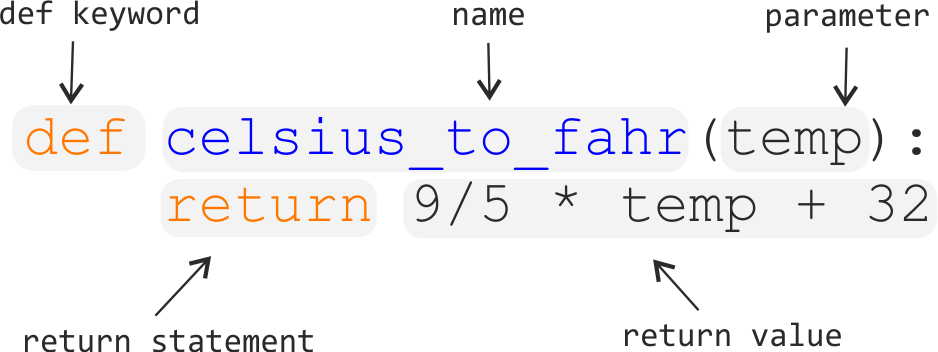
Anatomy of Python functions
- Start with the
defkeyword - Name is
lowercase_with_underscores - There can be one or several parameters (a.k.a. arguments)
- You can assign default values for arguments
- Function body is indented by 4 spaces and can have one or several lines
- Inside the body you can do everything you have seen so far!
 )
)
Example
- Function calls work with positional and keyword arguments
- Pass keyword arguments for any function with more than one argument!
In [14]:
def utility_crra(c, y=1.5):
    return c ** (1 - y) / (1 - y)
In [15]:
utility_crra(1.0)
Out[15]:
-2.0
In [16]:
utility_crra(1.0, y=0)
Out[16]:
1.0
Principles for Good Functions
Why functions are important
- Help to re-use code and avoid duplication
- Help to structure code and reduce cognitive load
- Make individual code snippets testable
- Help to make your projects more reproducible
- Unlock the power of functional programming concepts
- Are also the basis for good object oriented code
Pass all variables you want to use inside
- Inside a function you have access to variables in the enclosing scope
- This is dangerous because the behaviour of the function now depends on global variables
- Do not use this in your code!
In [17]:
# bad example
global_msg = "Hello {}!"
def greet_with_global(name):
    print(global_msg.format(name))
greet_with_global("Guido")
Hello Guido!
In [18]:
# solution 1: define inside function
def greet(name):
    msg = "Hello {}!"
    print(msg.format(name))
greet("Guido")
Hello Guido!
In [19]:
# solution 2: pass as argument
def greet_explicit(name, msg):
    print(msg.format(name))
greet_explicit("Guido", "Hello {}!")
Hello Guido!
Do not modify mutable arguments
- Arguments are passed by reference, i.e. without making a copy
- Make sure that functions do not modify mutable arguments!
- Make copies
- Avoid changing objects in the first place
In [20]:
def append_4(some_list):
    some_list.append(4)
    return some_list
my_list = [1, 2, 3]
append_4(my_list)
my_list
Out[20]:
[1, 2, 3, 4]
In [21]:
# better solution
def append_4(some_list):
    out = some_list.copy()
    out.append(4)
    return out
Dealing with files and path using pathlib
Why do we need pathlib?
- There are many ways to work with file paths in Python
- Some are not portable
- We want to give you one way that is guaranteed to work!
What you should not do
import pandas as pd
path = "C:\Users\xyz\Documents\python\lectures\03-more-python\data\iris.csv"
data = pd.read_csv(path)
- This only works on one Computer: it is an absolute path
- Backslashes ( \ ) only work on Windows
- Warning: This is what you get when you copy a path from your file explorer
What you should do
- Start paths relative to the root folder of the project
- Only make assumptions about directory structure inside the project
- Define the path in a way that is portable across operating systems
Get a path to the project root
Path(".") gives a relative
path to current directory
In [22]:
from pathlib import Path
# get a path to the current directory
this_dir = Path(".")
print(this_dir)
.
.resolve() makes it absolute for readability
In [23]:
this_dir = this_dir.resolve()
print(this_dir)
/Users/malka/Dropbox/teaching-uliege/Foundations-in-Data-Science-and-Machine-Learning/docs/m3
.parent moves up one
file/directory
In [24]:
# move up to the parent directory
root = this_dir.parent
print(root)
/Users/malka/Dropbox/teaching-uliege/Foundations-in-Data-Science-and-Machine-Learning/docs
- The output differs on every computer!
- No assumptions made on usernames or folders outside the project
Get a path to the project root
In a Python script, you can use the following code to get a path to the project root:
from pathlib import Path
# get a path to the current file
this_file = Path(__file__)
print("this_file", this_file)
# move up several times (here twice) to the project root
root = this_file.parent.parent
print("root", root)
- In a .py and a notebook file Path() would lead us to the current directory of the shell from which the file was executed
- The file variable is a magic variable with the path to the current file
From the project root to the data
- Once root is defined, the rest works the same in notebooks and .py files
- Concatenate different path snippets with /
- Resulting path works on all platforms!
In [26]:
data_path = root / "data" / "iris.csv"
print("data", data_path)
print(data_path.exists())
data /Users/malka/Dropbox/teaching-uliege/Foundations-in-Data-Science-and-Machine-Learning/data/iris.csv
True
File path rules
- Always use pathlib Path objects instead of strings
- Do not hardcode any parts of a path outside of the project’s directory
- Always concatenate paths with /
Remember:
If you copy paste a path from your Windows File Explorer, all three rules are violated!